Save Hours Every Week
Lessons, decks, worksheets, quizzes and reports that used to eat your evenings — generated in minutes.
Meet EducScope
EducScope carries the repetitive work of teaching — from building a lesson and its slide deck, to turning a markbook into evidence-based reports — so you can spend your time where it counts: with your students.
Choose the spreadsheet with your students and their marks. Names stay private before anything goes to AI.
Built for teachers & the schools they work in
We get it
When you're planning lessons and writing reports, it's easy to lose your evenings, your weekends, and the parts of teaching you actually love.
EducScope was built to give those hours back.
Why teachers switch
EducScope isn't another chatbot. It reads your files, understands your curriculum, and returns work in the format your school actually uses.
Lessons, decks, worksheets, quizzes and reports that used to eat your evenings — generated in minutes.
Clear objectives, real examples, speaker notes, and built-in support and extension for every learner.
Comments grounded in curriculum objectives and progress trends — not vague, generic AI praise.
Private by design, teacher-approved marking, and exports that fit your school's own systems.
Before the lesson
Type a topic. Get a lesson ready to teach.
A subject and a topic become a full lesson, an illustrated deck, worksheets, a quiz, and a game your class can play — all from one line of intent.
Open LessonScopeA classroom-ready deck with visual slides, speaker-friendly structure, and a downloadable `.pptx` file.

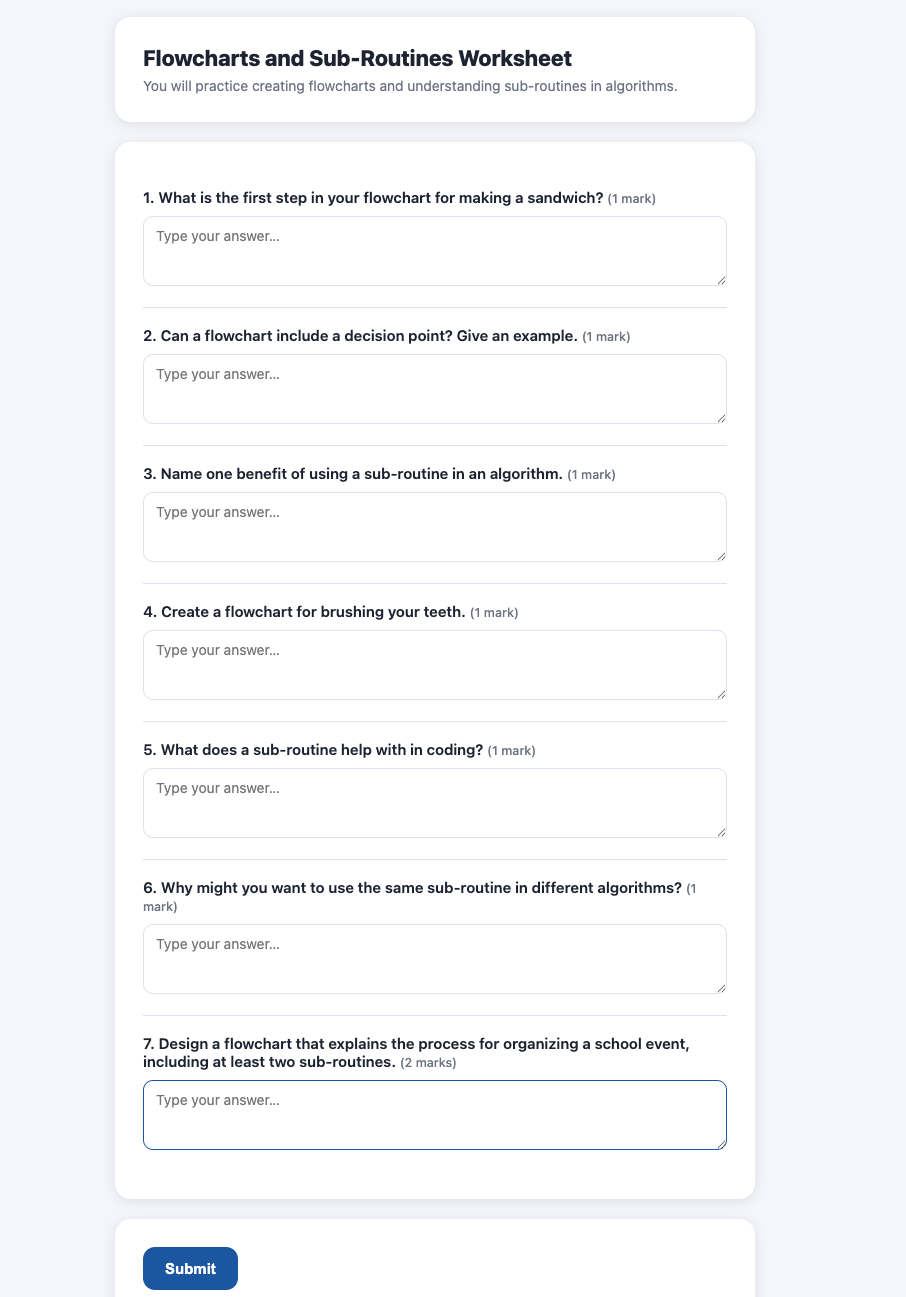
Enter “Maths, Fractions,” pick a grade, and get clear objectives, teaching slides with real examples and speaker notes, a check-in question, a hands-on activity, and a wrap-up — with built-in support for students who struggle and extension for those who race ahead.
The same lesson becomes a fully illustrated slide deck — real, relevant images and diagrams, not clip art. Swap any picture in a click, edit wording in place, and download a PowerPoint you can present straight away.
Generate a printable worksheet, a quick exit ticket, or a quiz — each with the answer key already done. Grab all three at once as a zip.
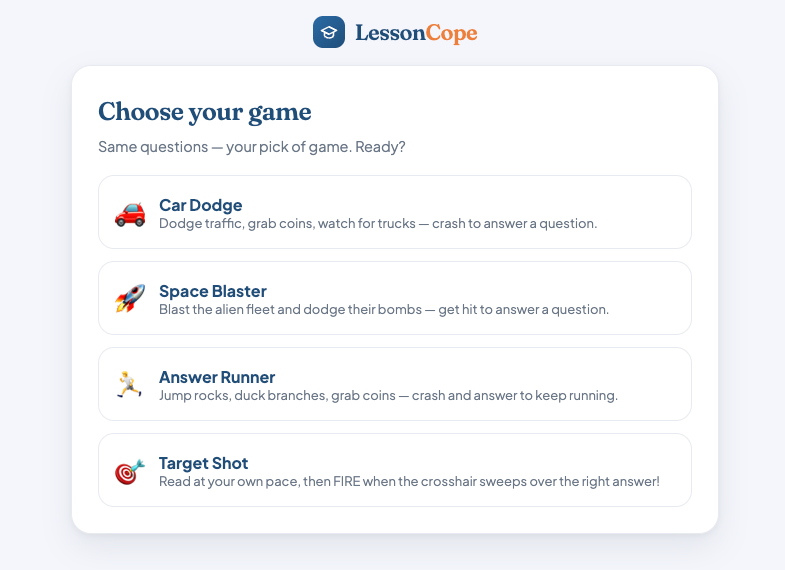
Revision becomes an arcade-style game your class plays on their phones or the board. Show a room code; students join on their own device — no app, no email.
Send a worksheet or quiz to students digitally. Short answers get marked by AI, but you stay in control — see exactly why each mark was given, override anything, and release results when you choose.
Upload any class spreadsheet once — it figures out the columns itself. Students join with a Student ID and a private 4-digit code. Forgotten codes are a one-click approval.
After the assessment
Turn a markbook into evidence-based reports.
Reporting infrastructure for schools: read the marks, map them to the curriculum, write grounded comments, route approvals, and export straight into the systems schools already use.
Open TeacherScopeChoose the spreadsheet with your students and their marks. Names stay private before anything goes to AI.
Upload a marks workbook and it reads the file even when layouts differ. It flags student rows, score columns, likely maximums, duplicates, and layout risks before AI is ever involved — and learns your patterns over time.
Score evidence is mapped to the right objectives — by code, or by the text itself when codes are messy. Uncertain mappings surface a review step, so comments are backed by curriculum-linked evidence, not vibes.
Each comment combines performance, linked objectives, inferred strengths and gaps, chosen learning habits, and progress trends: what the learner does well, where to grow, and the next step that helps.
Raw student names never reach the AI layer. Students are anonymized with private codes before processing, and real names are restored only locally when you review or export.
Export to CSV, or into your school’s own template — preserving the original workbook’s structure and dropping comments into the correct place. It fits your process instead of replacing it.
Approval flows, teacher/approver/admin roles, batch history, consistency, and AI-usage cost — a reporting control centre for heads of department and principals, not just a writing tool.
One continuous loop
Most tools solve one moment. Together, LessonScope and TeacherScope cover the full cycle — what you teach becomes the evidence you report on.
Loved by the people who use it
“I used to spend my whole Sunday building slides. Now I type the topic and the deck is ready — and it actually looks good.”
“The reports are the part I dreaded most. Having them grounded in the actual objectives, with my approval before anything goes out, changed everything.”
“Students join a game with a room code and they’re instantly hooked. Then the same lesson becomes a worksheet I can assign online. It just flows.”
Good questions
No. EducScope fits your process — upload your own lesson-plan template and every plan follows it, and reports export straight into your school’s existing workbook or template, not a format we force on you.
Yes. Student names are never sent to the AI layer — they’re anonymised with private codes before any processing, and real names are restored only locally when you review or export.
You stay in control. Comments are grounded in curriculum objectives and progress evidence, and you can see exactly why each mark or comment was given — and override anything before it’s released.
A full lesson plan, an illustrated slide deck (downloadable as PowerPoint), printable worksheets, a quiz and an exit ticket with answer keys, plus an optional classroom revision game and online assignments.
Both. A teacher can use it solo, while school leaders get approval flows, role-based access, consistency oversight and reporting dashboards across classes and subjects.
Get in touch
Tell us about your school or classroom and we’ll get back to you.
Start today
From planning a lesson to signing off a report — EducScope carries the repetitive work, and leaves the judgement to you.
Set up in minutes · Your data stays private · Exports into your school’s format